Building a virtual learning environment - First blog
I quit my job
Hey all, I recently quit my job and wrote about it on LinkedIn. The TLDR is that I'm super grateful to everyone at JPMC for the opportunities I got and the relationships I made. I decided to leave because I want to take time to upskill and transition into a more AI-centric role, such as AI Engineering.
Intro to series
While I upskill I'm going to be working on projects and will be posting what I learn as well. The first project that I want to focus on is a virtual learning environment to help me learn faster. I have read a few books on learning effectively (Learning How to Learn by Barbara Oakley, Ultralearning by Scott H. Young) and I want to apply some of the concepts I've learned. Some of the features I want to implement are:
- Quiz generation from the content I'm consuming (books, research papers, articles), and be able to submit them for review and keep history.
- Anki integration and generation for cards to study to retain information long-term.
- A personal AI tutor to keep track of what I'm studying/working on. It's there for when I need quick explanations, help finding information to consume, and for project ideas to apply knowledge fast.
I might think of more as I work on this and will add them, but for now that's all. I decided to do this project as a series of blogs. I decided to do this because I want to try to teach what I'm learning by sharing the project, and how and where each concept gets applied/used.
Plan
The first thing I decided to implement for this project is a RAG pipeline. This is because I have a ton of books that I'm reading to learn. With a RAG pipeline I can submit every book, article, research paper, and video that I consume and then be able to retrieve information about them. For example, I could generate an exam to check if I learned anything from reading a chapter or watching a video, or use the exam as a way to check what I know and don't. I could also generate Anki cards from the data to practice memory retention.
For the RAG pipeline, I built the following modules:
- Chunker
- Preprocessor
- Indexer
- Retriever
Quick knowledge check. These are high-level overviews for those who aren't familiar with RAG.
Chunker
The chunker takes data (like a 10-page article, or a book) and turns it into manageable chunks. There are a couple types of chunks (fixed-size, recursive, and others) each with different use cases. If anyone wants to get a quick overview, this X post by Akshay is good.
Pre-processor
The pre-processor's job is to strip any unnecessary words or characters that do not affect the context. This is to make the chunks smaller, and fix chunks that may have tons of whitespace and things like that.
Indexer
The indexer takes the chunks after they've been pre-processed and stores them in a way that makes them queryable. It can be a JSON file, a vector database, or a regular database. For now I'm using a JSON file, but I will be using a vector database soon.
Retriever
The retriever, as the name suggests, is the module that will be retrieving data in our RAG pipeline. The type of retriever you have is based on the type of data you have indexed. Term-based retrievers (find by searching the term) and embedding-based retrievers (find by searching relatedness/semantics) are the two types of retrievers for RAG. For now I have a term-based retriever.
Building
The chunker
I started off with the chunker. Initially, I just wanted to get something running quick. I decided to go with a naive chunker (fixed-size) with a fixed length of 250 characters. Once I had this working and ran a few epub books through it, I saw how it wouldn't work for this project, it ended up cutting words halfway through, splitting sentences, etc.
I switched from "fixed-size" to "document structure-based" chunking, which works great for data that has structure, such as books. I'm starting this project loading like 30+ books I own. This chunking strategy will allow me to go through chapters, then sections, then paragraphs, then sentences.
Later on when I start submitting different data, such as research papers or articles, they will have different formats or structures. I'll have to update the chunker to be able to chunk/process that data correctly. So for now I'm doing it in a way that's modular and extensible in the near future.
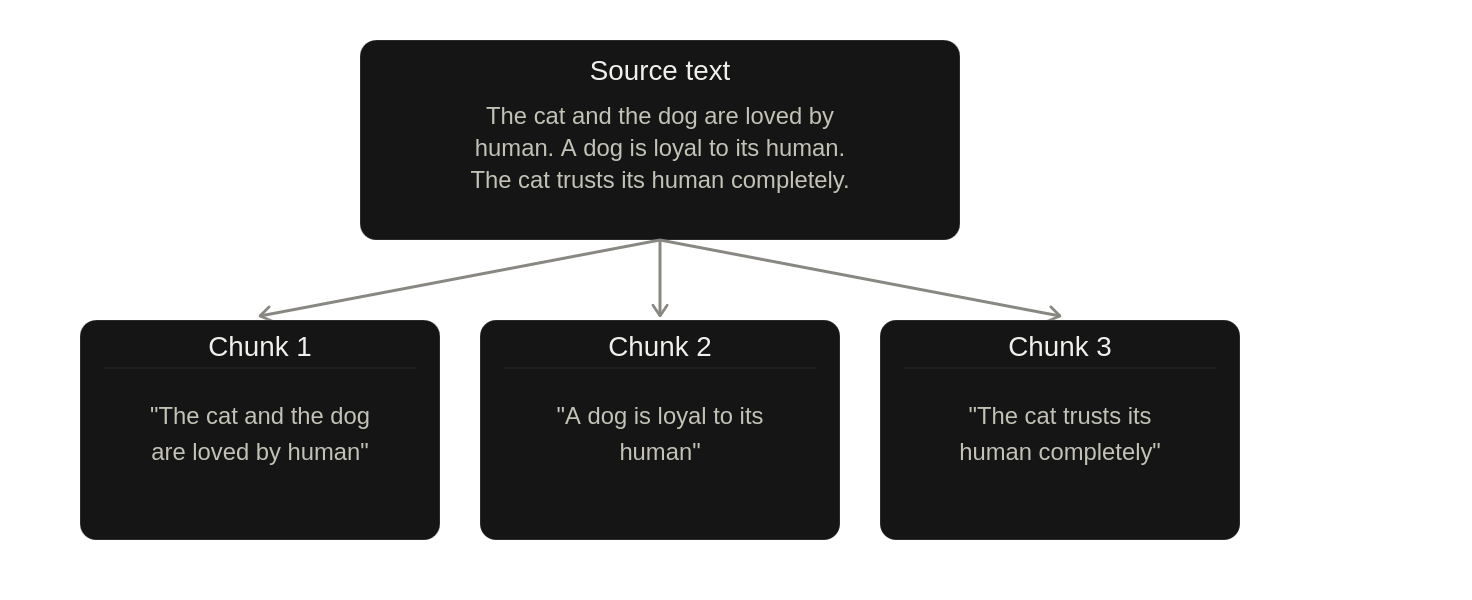
Here is an example source text and the chunks it would produce (assuming the paragraph was too long and had to be split by sentences):
The pre-processor
The chunker does not remove anything from the data; it only splits it into chunks/pieces. The pre-processor is in charge of editing chunks. I noticed that some of my chunks had a lot of whitespace and some punctuation I didn't want. So I used the pre-processor to remove them.
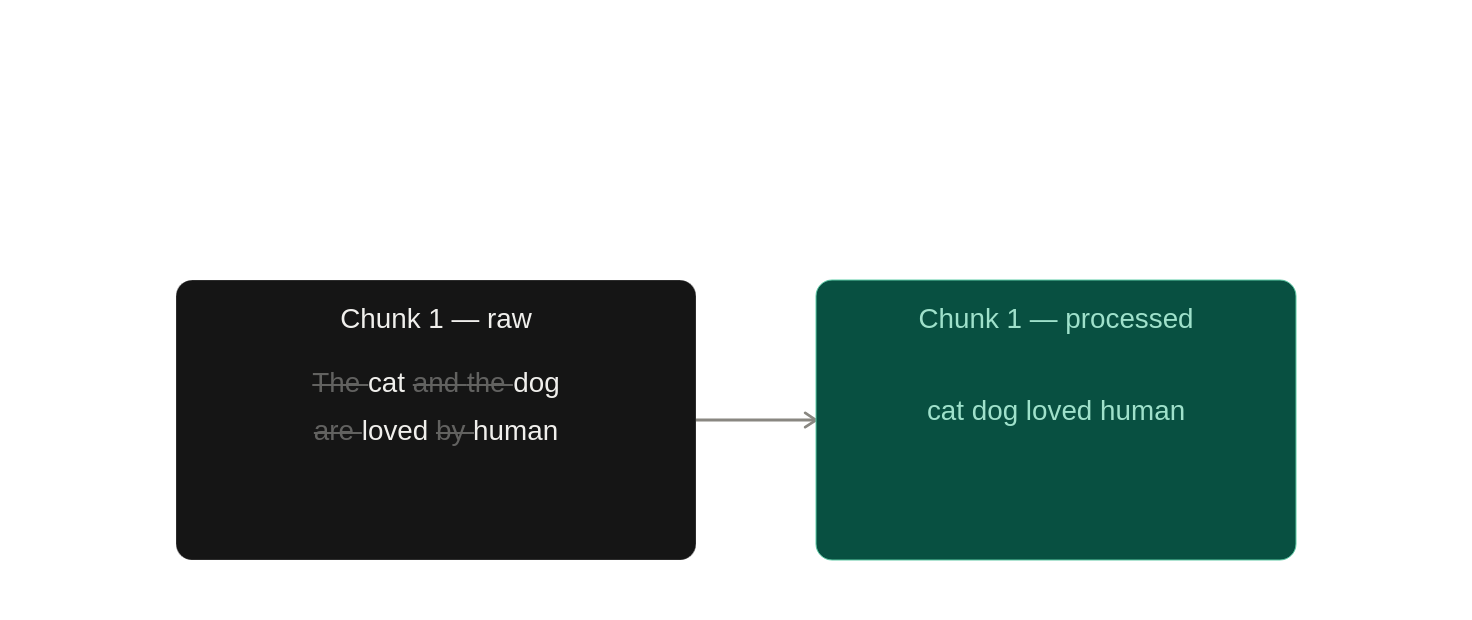
All it does is strip the text, remove certain words, and convert every letter to lowercase.
Following the example from above, this is how chunk 1 would be before and after being processed.
The indexer
Alright, this section will have more detail (it was the most fun module for me).
Since I am indexing books first, and because I've gotten a lot of them from Humble Bundle that are part of an overall topic such as AI or Data Science, I thought term-based would be good to implement first — to ask something like "Hey, which of my books have information on X topic?" or "Can you find the chapters of X book that talk about Y?".
For term-based indexing you can use two algorithms: TF-IDF (Term Frequency-Inverse Document Frequency) or BM25 (Best Matching 25). The main difference is that BM25 normalizes terms and TF-IDF does not — TF-IDF will rank a document higher if the term appears in it a lot, paying no attention to the document's length. That means that a 1,000-page book that repeats a term 100 times will score higher than a 10-page article that has the term 40 times. For now, regardless of that, I went with TF-IDF for simplicity. In the future when/if I see problems with this, I'll switch to BM25.
The TF-IDF value is the product of the Term Frequency (TF) and the Inverse Document Frequency (IDF). Each chunk will have a list of TF-IDF values, one per term, which is what the retriever uses to find the chunks.
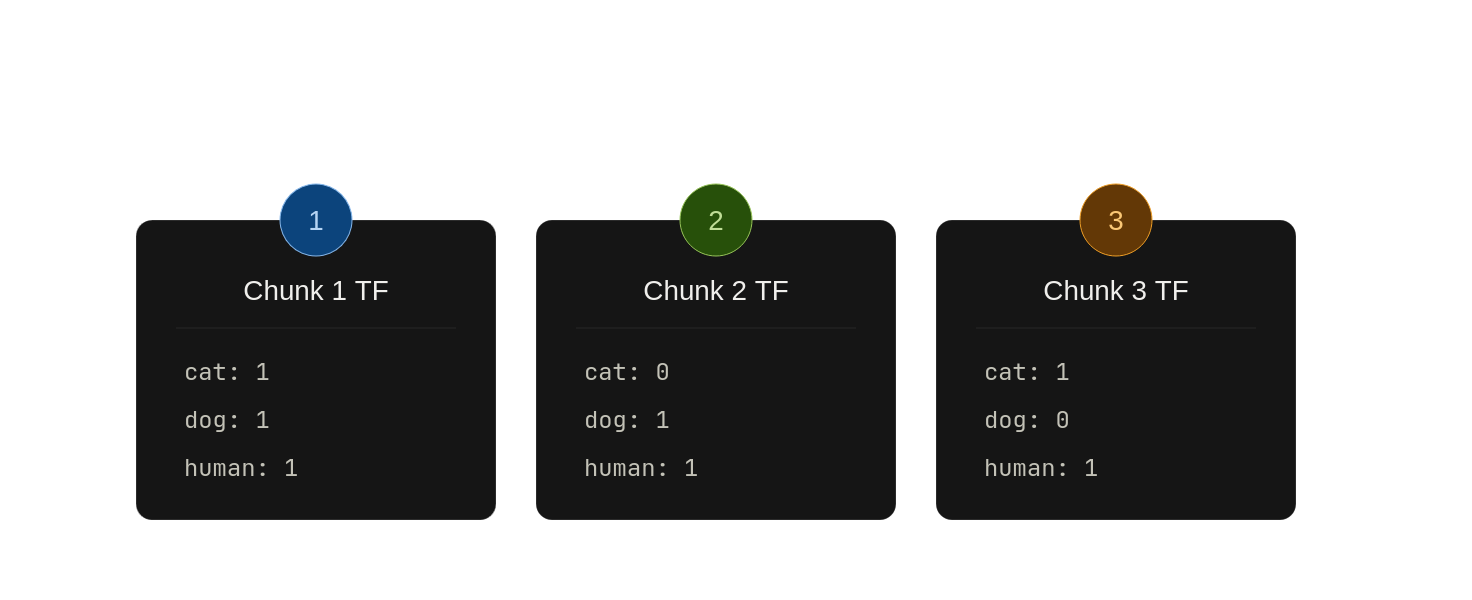
Following the example from above, these would be the results after calculating the TF for each chunk's term. Keep in mind, I am focusing only on cat, dog, and human terms to simplify the example.
Next, the IDF value can be calculated. The IDF value is the frequency of a term across all the documents. In other words, it's the count of the number of documents a chunk appears in. The IDF results for the terms in the chunks are:
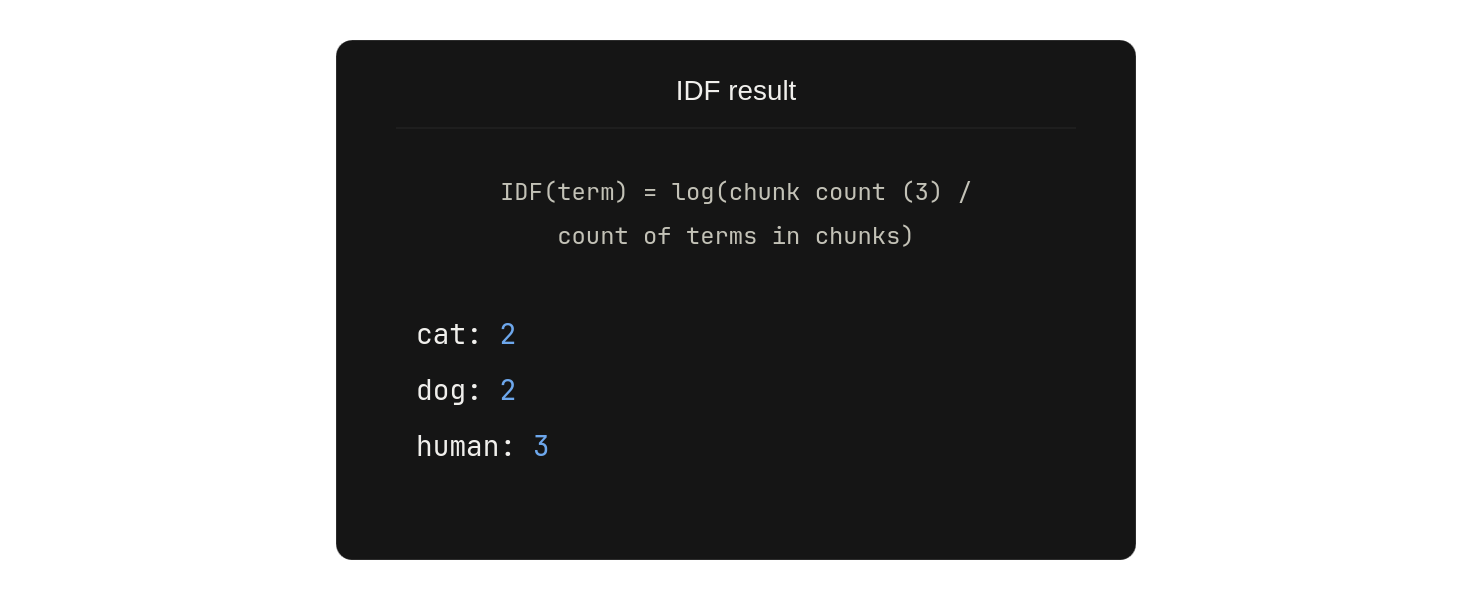
As you can see, cat has a value of 2 because chunk 1 and chunk 3 have the term (it does not matter how many times because IDF only cares if it's present in a chunk/document or not). dog also has a value of 2 because chunk 1 and chunk 2 have the term. human was present in all 3 chunks, so its value is 3.
The IDF value still hasn't been calculated. First, the pipeline needed to calculate how many documents or chunks each term appears in. Once it has that, the actual IDF value is calculated using this formula: log(document or chunk count/count of term in chunks). For example, for cat, it'd be: log(3/2)
Finally, with the TF and IDF values ready, the pipeline can generate the TF-IDF by going over each chunk. The pipeline multiplies each TF by its IDF value. Here is a table of what that'd look like:
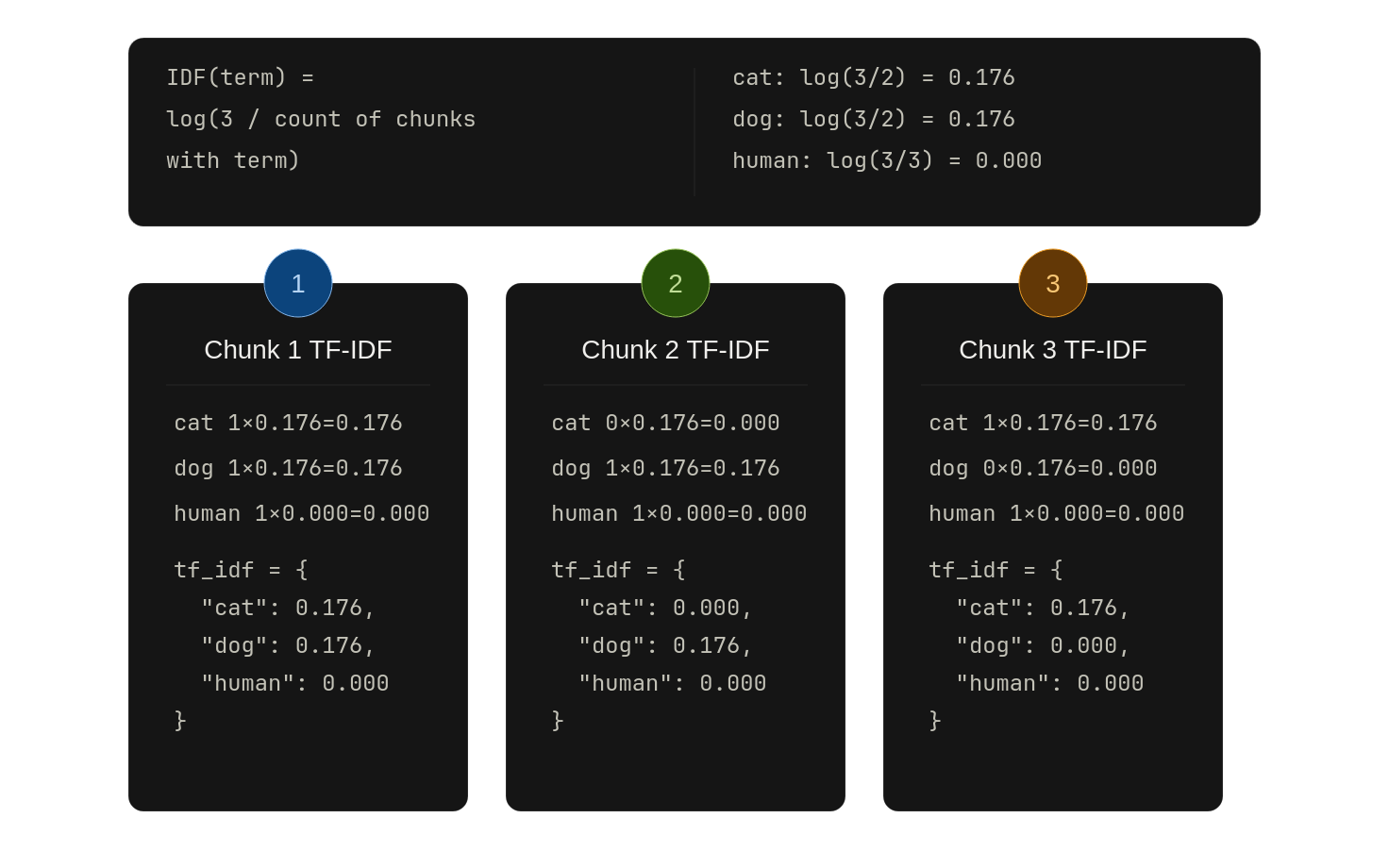
Each chunk will have a tf-idf map with the term as key and its tf-idf as value, just like in the boxes above. The indexer that I have at this moment saves all of this in a huge JSON file.
Retriever
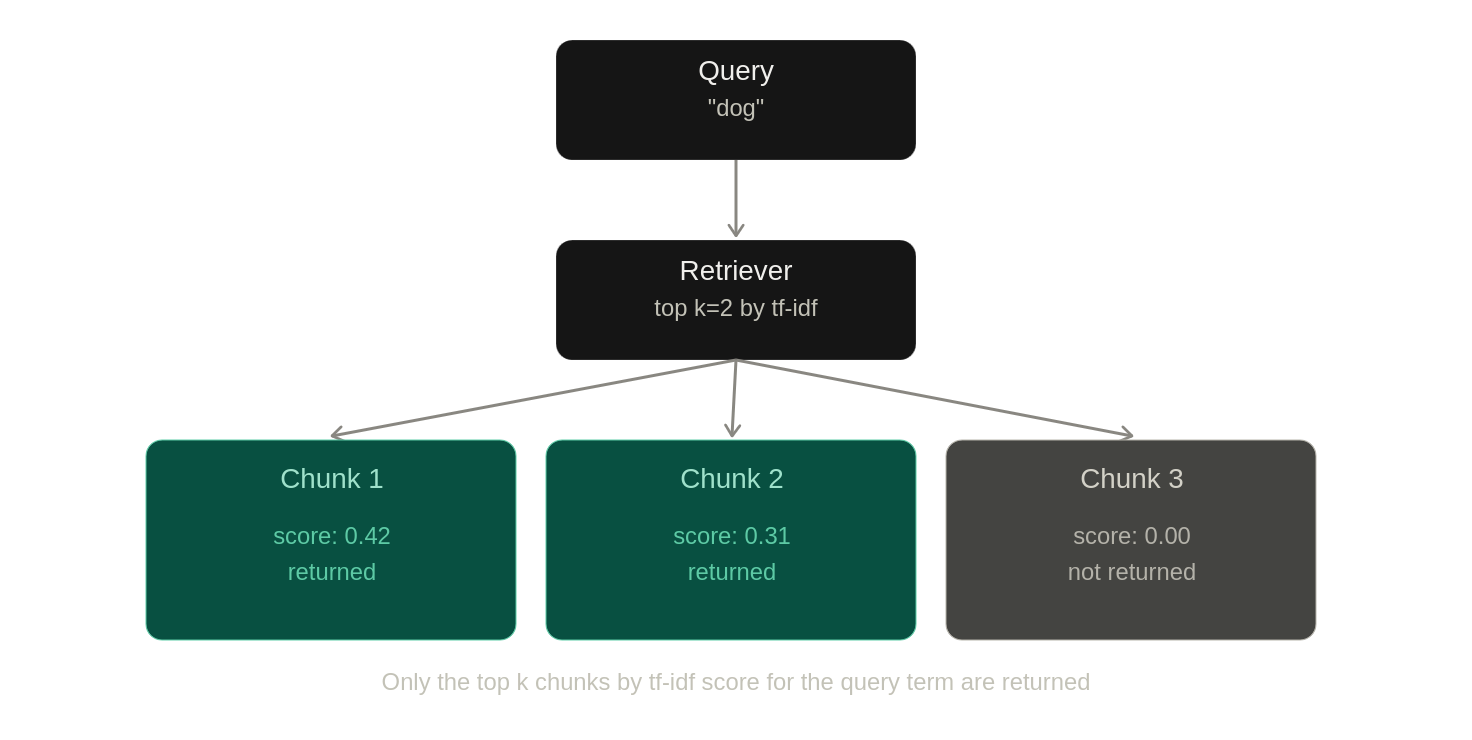
Lastly, the retriever is straightforward; it has a flag k which is used to find the top k values. The way I chose to do this for now is to load the JSON file that the indexer makes, chunk and pre-process the query as well (to be able to get the terms in it) and then use those terms to get the top k TF-IDF values it can find.
Example of querying for dog and what the retriever would return:
Next steps
This is by no means complete. I still need to connect it with a model and start running queries against it. I'm planning to use a local model (Qwen3-8B) and if it's not good, then I'll use one of the flagship models through OpenRouter.
After that, I'm going to implement a prompt for exam/quiz generation and verification. When that's working correctly, I'm going to make the actual UI. I decided to go with a desktop app for this project, which should be fun because I've never made one. Once I have the UI, I'll hook it up with Anki. At this point, I should have an environment I can use to study/review things.
This project is primarily for myself, so I'll be adding things as I need them. I do plan on open sourcing it as soon as possible. When it's ready, I'll make a blog post and announce it on my socials; hopefully this project is useful for others as well.
Thank you for reading.