Building Astron — a Workout Tracker That Lives in Your Browser
Intro
Over the past three weeks, I built Astron, a workout tracker that behaves like a native app but lives entirely in your browser. In this post, I'll walk through what pushed me to build it, how I approached the design, the implementation details (tech stack, auth, data migrations, and all), what I learned along the way, and where I'm taking it next.
Astron is live at useastron.com — I've been testing it with a few friends (huge s/o to Mike, Thomas and Jasmine) and would genuinely love your feedback too.
Motivations
I've been working out on and off for most of my life. The past couple of years I got more and more into it (especially calisthenics) and for the past 2-3 years, this is how I logged my workouts (Google Keep!):
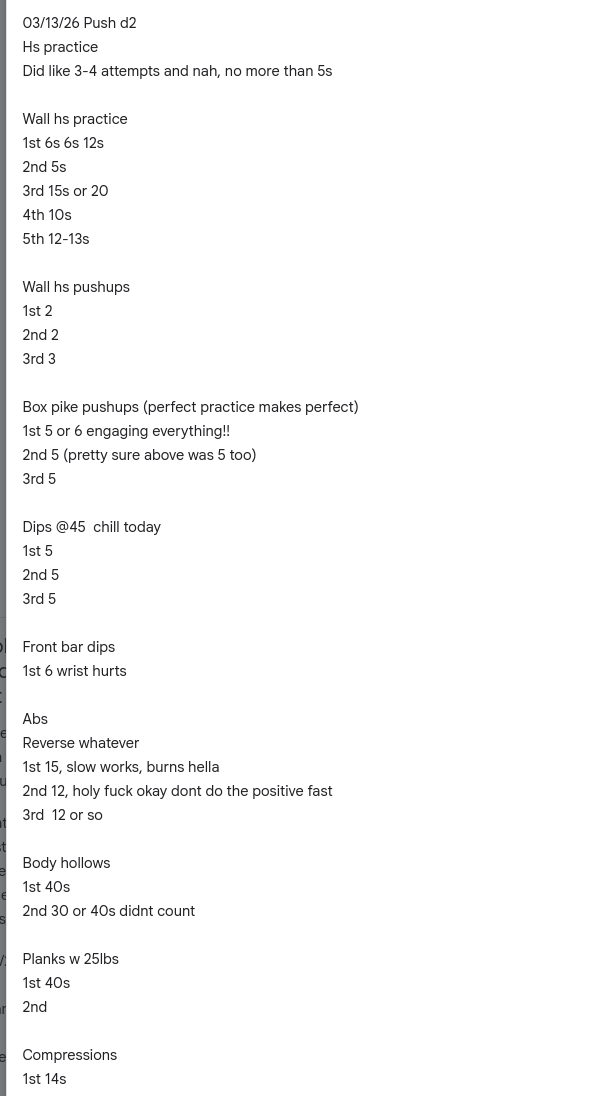
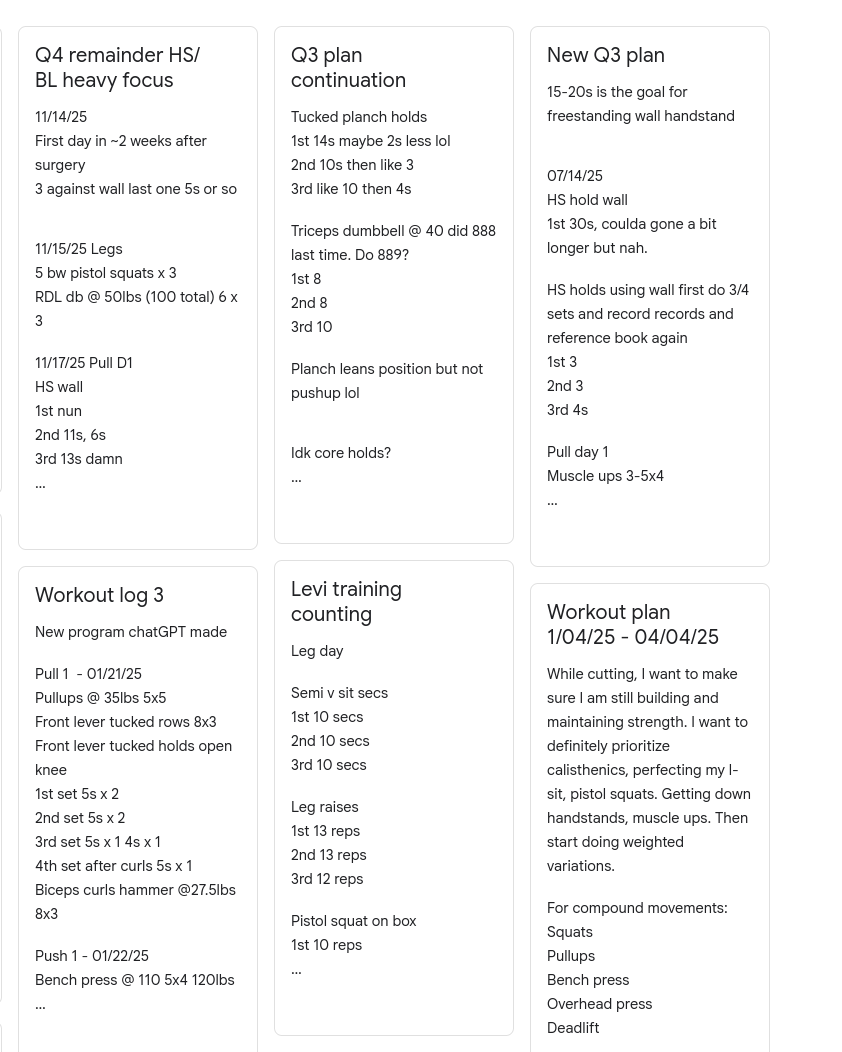
This was easy enough to do (which is why I kept doing it for so long). I'd just open my notes app and log whatever I was doing. But as I progressed and my goals grew, things got difficult. One of the problems was that Google Keep (as well as Samsung notes) limit how many characters a note can have, so at some point you'll run out of space. Another problem was being able to answer some questions easily. For example, I'd think to myself "How much did I squat last week?" so I could add more weight — to find out I had to scroll a wall of text to find that one entry. Other questions I couldn't easily answer:
- "What was my longest handstand this month?"
- "This is a PR, but what was the one before?"
- "Have I been progressing like I want (5lbs+ per week on squats)?"
Some of you might be thinking: why not use an existing app? Why bother making something? The truth is, I did try a ton of apps before I decided to make this one. In fact, these are some of the apps I tried and why I didn't like them:
| Application | Reasons why I didn't like it |
|---|---|
| Fit Notes | Ugly design imo, feels old. Was trying to charge me $6.99 to be able to enter time, for example if I wanted to enter "HS hold for 10s" |
| Strong | Insta account requirement. Didn't want an app |
| Gymbro workout tracker gym log | This one had potential but I didn't like having to choose a primary muscle and I believe I wasn't able to create new ones or something like that. I also did not like the design and I couldn't specify a time-range for an exercise (I need that for isometric exercises such as front lever, back lever, etc) |
| JetFit | Couldn't even test it without making an account |
After going through all of those and not being happy with a single one, I decided to build my own. I want it to have these features:
- Extremely low friction to try — jump in, test it, leave if you don't like it.
- No profile creation requirement — this isn't an app that generates workouts for you; it's for people who already have a routine and just need somewhere to track it.
- No app install requirement.
- Good UX, built around actually creating routines and logging workouts.
- Free — no ads, only pay for actual features that provide real (more than basic) value, which the app does not have at the moment.
Thinking through app design
Data
With the motivations in place, it was time to design the schema. It's relational (Postgres, of course), and intentionally simple:
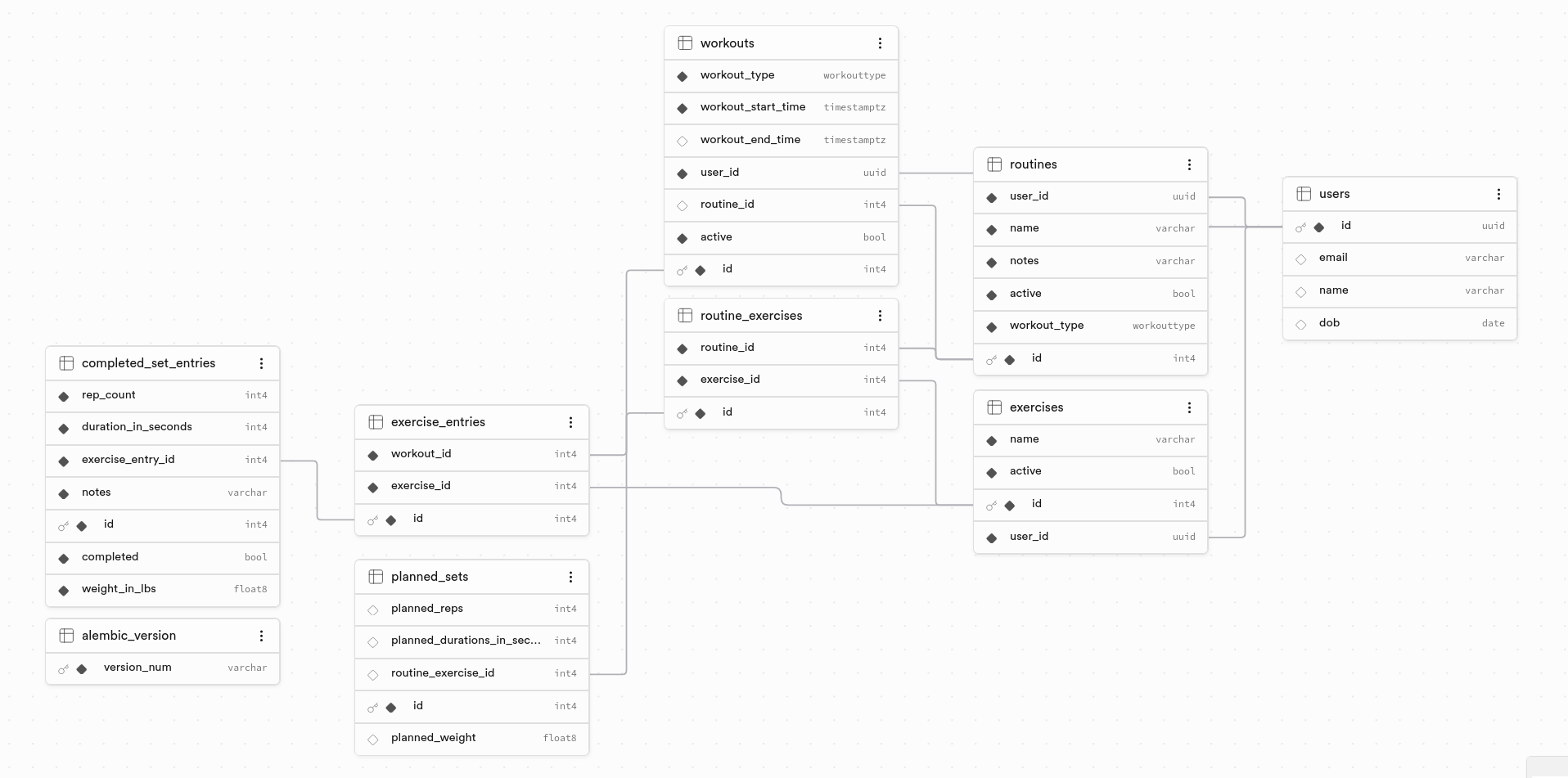
- A routine defines its own set of routine-exercises and belongs to a user.
- Exercises are user-specific. Originally I made them global, mainly to avoid 10 different users all creating their own "pull ups" row. But the more I thought about it, the less it made sense:
- Everyone types exercises differently — "pull ups", "Pull-Ups", "pullups"
- This app targets athletes across different disciplines to log their workouts/create routines. Someone into bodybuilding doesn't need to see "planche holds" cluttering their exercise list — that's specific to calisthenics.
- I eventually want to offer pre-defined exercise lists tailored to a specific sport or training style that users can opt into. That means exercises need to be attachable to individual users, not shared globally, so I can target the right set of exercises to the right user.
- A workout can be started from a routine (which loads all its exercises automatically) or as a free workout, where the user enters any exercise and sets/reps on the fly.
- Each user can see and manage their own routines and exercises.
I used Supabase for both the database and authentication, and it's honestly become one of my favorite tools this year — more on why in the auth section below.
Server
Python's been growing on me for a while, and I wanted to actually master it rather than keep using it "here and there." I built most of the server by hand — reading FastAPI's docs directly and working through the fundamentals myself — up through data modeling and endpoints. When I got to setting up server-side authorization, I started using Claude Code (I call it Claudy :p) to move faster, and did the same later on for parts of the migrations work while refining the schema.
Here are the libraries I used:
- FastAPI for the API layer.
- SQLModel to bridge Pydantic data objects and Postgres tables in a single model definition.
- Pydantic for data validation and parsing.
- Alembic for schema migrations.
Frontend
I went with Next.js for a couple of reasons. First, practical: I already host most of my projects on Vercel, and deploying both frontend and backend there (via Vercel Functions) meant one provider for deployments. Second, technical: since almost everything (workouts, routines, exercises) needed to be loaded from the server, I wanted a React-based framework. I was also new to Supabase, and Vercel's docs on connecting Next.js and Supabase made that integration easy.
CI/CD
I'd read about GitHub Actions but never used them, so this felt like a good time to learn it. My goal: every PR triggers a CI build, and the PR can't merge until it passes. I had that working in just over an hour (not bad for someone who never did it, and doing it all by hand lol)
The whole system
Zoomed out, here's the full stack:
- Python.
- Next.js.
- GitHub Actions.
- Docker, for local development.
- Supabase CLI, to run Supabase's services locally during dev instead of testing against production.
- Resend, as the SMTP provider for auth emails.
What I wanted from this setup:
- Fast local iteration — see changes immediately.
- The ability to work on one feature at a time, with CI catching failing tests and blocking a PR before it can break the app.
- A local Supabase environment where I could actually understand how the system works under the hood — how email templates are configured, how auth flows behave.
In the trenches (what happened during build time)
I'm sharing some of the pieces that were interesting or fun to work through. Worth noting: I work primarily in Java, so Python is still new stuff for me — mastering it is very much the goal.
FastAPI and endpoints
Once the models were in place, I mapped out the endpoints I'd need and started building with FastAPI. One thing I really like about FastAPI is how easily it lets you define parameters, security schemas, and object dependencies together.
For example, here's an endpoint (post_workout) to create a workout. Conceptually, it needs a database session, the user the workout belongs to, the workout data itself, and a JWT to authorize that user. But notice that the function signature only takes workout directly — service is a dependency that resolves the session, the current user, and the JWT authorization automatically:
def get_workout_service(
    session: Annotated[Session, Depends(get_session)],
    user: Annotated[CurrentUser, Depends(get_current_user)],
) -> WorkoutService: return WorkoutService(session, user.id)

WorkoutServiceDep = Annotated[WorkoutService, Depends(get_workout_service)]

@router.post("/")
def post_workout(workout: WorkoutCreate, service: WorkoutServiceDep):
    result = service.create_workout(workout)
    if result is None:
        raise HTTPException(status_code=500, detail="Could not create workout")
    return result
Thanks to FastAPI, the post_workout endpoint only takes workout: WorkoutCreate as its body parameter, so the expected JSON is just:
{
  "workout_type": "pull",
  "workout_start_time": "2026-07-01T18:21:12.013Z",
  "routine_id": 0
}
service never shows up in that payload (it's resolved as a dependency, not passed in by the client). That's the part I love about FastAPI's pattern: without dependency injection, I'd have to manually construct the service and session, and resolve and authorize the user, inside every endpoint that needs them. This way, I declare each dependency once and reuse it anywhere.
Supabase
This is the tool I completely fell in love with on this project. I'd heard tons of people talk about it for a while and always wondered what the fuss was about (now I get it!).
Signing in and spinning up a project took less than five minutes, and I had a working database ready to connect to. The UI is clean, and things literally just work. That made me curious about what's actually happening under the hood:
- Where does my database actually run?
- How do the different connection types work?
- Could I replicate this myself, and get it for free?
Supabase auth logic (why I went with app logic instead of RLS)
I chose Supabase for authentication partly to see how it worked and why so many people go with it. Going through their docs, I noticed they push pretty hard for row-level security (RLS) right out of the gate — something I'd never used or even heard of before.
RLS lets you add policies to a table that get evaluated at query time. A policy might say something like "does user_id on this row match the user_id making the query?" — if true, the row is returned; if not, it's excluded, as if it didn't exist.
RLS is especially critical when clients query the database directly (such as raw SQL from the frontend, with no server in between). Since I'd already built a server with SQLModel handling all my queries, I decided to put the authorization logic there instead of pushing it down to the database. So instead of RLS, I handle authorization in the app logic. Here's how it works:
- The client's session is managed by Supabase, which issues a signed JWT.
- When the client calls the server (say, to fetch a user's routines), it sends that JWT along. The server validates it and checks that the requesting user is actually authorized to access the data they're asking for.
This works well for my use case and I'm comfortable with the security trade-off — I'm leveraging Supabase's JWTs for identity, and my server enforces authorization on top of that. If my server gets a valid JWT that has a different identity than what the query wants, it will reject it. The request will never reach the database.
(I know I could have both RLS and app-level auth. However, at this stage, I decided that what I have now is enough and don't want to add more complexity. Once I add a few more features, I will reconsider this approach)
Supabase database connections
Turns out that when you launch a Supabase project, they provision a dedicated Postgres instance on AWS for you. If I tried to do that myself (spinning up an EC2 instance and running Postgres on it), the free tier wouldn't get me far and I'd have to start paying rather quickly. Supabase's free tier is definitely generous.
Supabase offers two connection types: direct connections and pooled connections (via their connection pooler, built on PgBouncer/Supavisor). This distinction matters a lot for serverless compute like Vercel Functions. Postgres has a hard limit on how many concurrent connections it can hold open (each connection consumes resources from the database server, so there must be a ceiling, or the server risks running out of memory or crashing under load). If 50 Vercel Functions spin up simultaneously and each one opens its own direct connection to Postgres, you can blow through that connection limit almost immediately. On top of that, every new connection has real setup cost (a TCP handshake, followed by a TLS handshake, and Postgres's own authentication step) which adds latency you don't want to pay repeatedly for short-lived serverless invocations.
Pooled connections solve this problem by sitting a connection pooler in front of Postgres: the pooler maintains a smaller set of direct connections to the database, and incoming client requests go through the pooler and share those connections instead of each one opening its own. The pooler handles the pool of connections itself, so serverless functions only need to worry about reaching the pooler and getting handed a connection — removing that overhead from the functions themselves.
Supabase CLI
The Supabase CLI made it easy to run all the services (Postgres, dashboard, auth service, and mail server) all through docker compose. I set environment variables for both frontend and backend to point at the local Supabase services and ran everything from there.
One thing that tripped me up: setting up an email template locally hit a Supabase CLI bug (which has been there for about 3 years). The docs say to use relative paths for email templates, but that only works for auth.email.template.* templates. For auth.email.notification.* templates (which is what my auth flow uses) you need an absolute path instead. It's an annoying thing in how their config resolves paths. Not annoying enough for me to dig into a fix, and the issue looks closed on their end, so I'm not even sure if it's actually a bug.
Supabase authentication and issues with magic link
My original plan for auth was as frictionless as possible: no password, just a link emailed to you. Except a few early testers (shoutout to Thomas, Mike and Jasmine) hit a weird bug — the first magic link they received wouldn't authenticate them, but every link after that worked fine.
I couldn't reproduce it locally. Digging into it, I found this has been a known issue for years: some email providers automatically scan incoming links to check for malicious content, and that scan itself "opens" and expires the link before the user ever clicks it themselves.
The fix I saw many people do is ditching magic links for a one-time password (OTP) (still email-based, but the user enters a code instead of clicking a link). I didn't love adding that extra step, but for now, it's what works. Google and Apple sign-in are next on my list, which should get auth down to a single click for users who want to sign in with Google and Apple.
Supabase email limits and how I got over that
Something else I didn't catch upfront: Supabase's free tier caps you at 2 emails per hour. Since my auth flow depends on email notifications, that limit wasn't workable, so I set up a dedicated SMTP provider to handle sending. I landed on Resend, which has a generous free tier — 100 emails/day — with pay-as-you-go available if I need to scale past that.
Data migrations using Alembic
I was surprised to find that SQLModel doesn't handle migrations at all (seems like it came out a couple years ago, and their docs have absolutely nothing on the topic). A quick online search pointed me to Alembic, which most SQLModel/SQLAlchemy users rely on for this.
I wish I'd set up migrations from day one instead of retrofitting them after the schema had already evolved. Here's roughly how that played out:
- v1 — initial schema, generated by running Alembic against an empty database.
- v2 — added the columns needed for Supabase auth integration.
- v3 — added a
completedflag on individual sets. - v4 — switched integer to decimal for sets weight (I completely missed that).
Right now, every schema change means generating a new migration and running it manually. Eventually I'd like to turn this into a CD pipeline with GitHub Actions — I just need to look into whether conditional arguments are possible there.
Overall, Alembic does exactly what it needs to: it's easy to set up, and I really like that it can generate raw SQL offline to verify a migration.
Next steps
Going offline first (or second (dumb joke mb!))
Astron became a progressive web app (PWA) as I worked on it. For anyone unfamiliar: a PWA is a website that uses a service worker — a script that runs in the background, independently of the page itself — to behave more like a native mobile app. One of the things a service worker can do is intercept network requests, which (combined with local storage like the Cache API or IndexedDB) is what makes offline support possible.
Right now, Astron does not work offline. I built it online-only from the start, and by the time I realized how useful having offline mode would be (since a lot of gyms have slow connections and what not), most of the app was already built. I've never designed an offline-first app before, so there's some learning and design work I gotta do in order to set this up properly.
The goal: once this ships, you should be able to use Astron almost entirely offline (log workouts, create routines, etc) and have everything sync automatically the moment you're back online.
Use data to find personal records (PRs) and patterns
I want to have a page where people can see their PRs. I am thinking this will be pulled automatically from workout history — all-time PRs, and then 3-6-12 month ones, or something along those lines that I want to refine.
I know not everyone is competitive and some people work out for the health benefits and don't care much about the number. However, there are many people that do care and I am one of those, plus I think everyone could benefit from seeing this and realizing how much they've improved over time. It just makes you feel happy to see your own progress.
Data replication to not lose users data
At the moment there is no data replication, if something happened to my Supabase database I'd lose everything. I'm planning to fix this as soon as possible. I'm looking into exporting the data and creating backups in S3 maybe? I want to find a cheap option that I can run once a week or month. If anyone has any recommendations please let me know.
OAuth Social authentication with Google and Apple
Since the magic link didn't end up working and now you have to enter an OTP, I really want to enable Google and Apple authentication for anyone who'd rather use that to log into the app. I just need to make the accounts for each provider and complete the setup, so don't expect this to take too long.
Voice feature to not have to enter stuff manually
This is the one that I feel is more a nice to have and maybe lower prio, but allowing users to simply say: "Hey, so I did X routine today, I completed everything that was planned, for squats I did 300lbs for the 5 sets, for RDLs 425 for 3 sets and 420 for 2 sets, ..." and let AI handle the creation of the workout for the user to just confirm if it's correct would be nice, for anyone who doesn't want to type manually. However, doing this will definitely incur costs associated with the AI APIs so I'll see how I can either offer some of it for free or if I'll have to block this for someone who wants to pay for it.
I haven't even planned to charge for anything so I'll have to come up with something before enabling this.
Share feature (that I'm excited about)
The overall idea of this application was to simply track your workouts, that's the truth. I wanted it for myself, but as I started to make it, I thought it wouldn't be difficult and would make me feel better to make it not only for me but anyone who wanted to use it.
I don't run, but I follow a few runners on Instagram, and I've seen the Strava app come up. I've never used it myself, but they have a share feature that shows distance, pace, and even a little map of your route. I want to think of something cool like that for this app — a share feature that shows the workout you did, maybe highlighting some numbers or PRs if any. I'll share more when I refine this.
Special thanks
A few friends (all sharp folks in tech) tested Astron early on and gave feedback on this post as it came together. I'm lucky to have people this generous with their time, and wanted to give them a proper shoutout: